MiniBook WordPress & HTML Plugin
Introduction
The MiniBook WordPress / HTML plugin is an extension of the MiniBook ecosystem that allows radio amateurs to publish live station information directly to a website.
Its purpose is simple and focused:
Expose real-time operating status from MiniBook to the web — cleanly, safely, and without complexity.
The plugin is not a remote-control interface, nor a cloud service. It is a presentation layer that reflects what is happening in MiniBook, nothing more and nothing less.
Why a Web Plugin?
Many radio amateurs like to show:
- Whether their station is currently ON AIR or OFF AIR
- Which band, frequency, and mode they are operating
- Live activity during portable operations or special events
Traditionally, this required:
- Manual website updates
- Custom scripts
- External services or cloud platforms
The MiniBook WordPress / HTML plugin removes that complexity by letting MiniBook itself publish the data.
How It Works – High-Level Overview
The plugin operates on a push-based model:
- MiniBook generates live station data
- MiniBook sends updates to the website at regular intervals
- The plugin stores the latest snapshot
- WordPress (or plain HTML) displays this snapshot
There is:
- No polling from the website
- No direct database access from MiniBook
- No persistent connection required
This makes the system robust, lightweight, and hosting-friendly.
Supported Output Modes
WordPress Plugin Mode
When installed as a WordPress plugin, MiniBook data can be displayed using:
- Shortcodes inside pages or posts
- Sidebar widgets
- Theme-integrated blocks
Typical use cases:
- Live station dashboard page
- Sidebar ON AIR indicator
- Portable operation status page
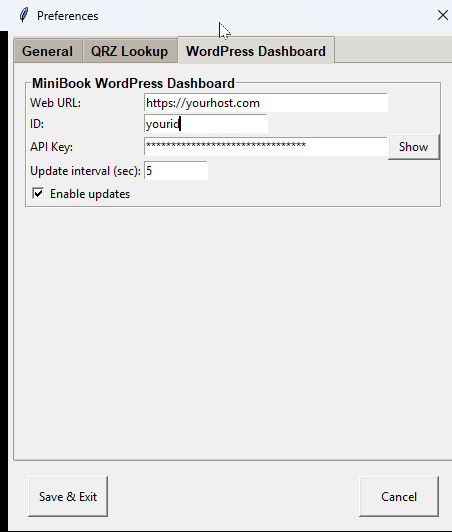
Screenshot placeholder:
Screenshot 1 – MiniBook Preferences page showing WordPress connection parameters
Additional screenshot placeholder:
Screenshot 1a – Location of the API key inside MiniBook

Standalone HTML Mode
For users who do not run WordPress, MiniBook can also generate:
- Static HTML snapshot files
- Hosted on any standard web server
This allows the same live data to be displayed on:
- Personal websites
- Club pages
- Event or expedition pages
Screenshot placeholder:
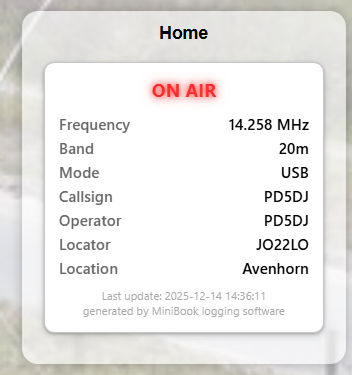
Screenshot 4 – Embedded HTML snapshot shown inside an iframe
Embedded with IFRAME
<iframe src="https://yourdomain.com/wp-content/uploads/minibook/qrz-YOURID.html" width="100%" height="300" frameborder="0" scrolling="no"></iframe>
Using Shortcodes, Widgets & Embedding
Shortcodes in Pages and Posts
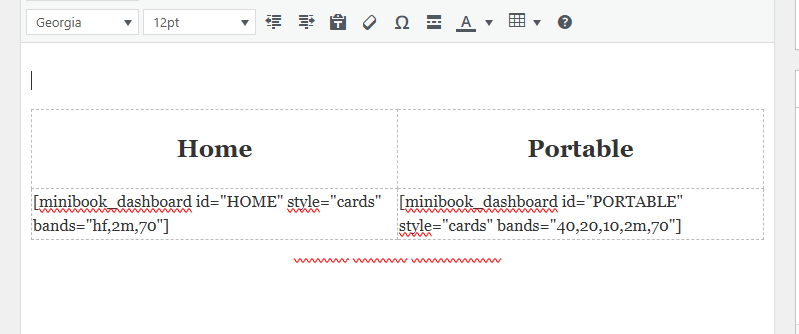
MiniBook provides a shortcode that can be placed directly inside a WordPress page or post.
This allows the live station status to appear as part of normal page content.
Screenshot placeholder:
Screenshot 2 – WordPress editor showing the MiniBook shortcode inside a page or post
Shortcodes are ideal for:
- Dedicated station pages
- Special event pages
- Portable operation summaries
Sidebar Widgets
The plugin can also be used as a sidebar widget.
This is especially useful for:
- Persistent ON AIR / OFF AIR indicators
- Compact live frequency displays
- Always-visible station status
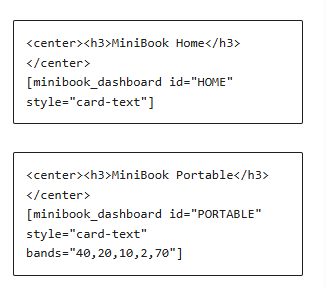
Screenshot placeholder:
Screenshot 3 – MiniBook widget configured in a WordPress sidebar
Displayed Information
The plugin is intentionally limited to operational status, not logging details.
Typical displayed fields include:
- ON AIR / OFF AIR status
- Callsign
- Frequency
- Band
- Mode
- Operator name (optional)
- Timestamp of last update
No QSO data, logs, or personal information are exposed.
Security & Design Philosophy
Security and data integrity were key design goals.
The plugin:
- Accepts only inbound updates from MiniBook
- Does not allow remote commands or control
- Stores no credentials from MiniBook
- Keeps data isolated per station or ID
Each MiniBook instance can publish under its own unique identifier, allowing multiple stations to feed the same website safely.
Performance & Reliability
The MiniBook WordPress / HTML plugin is designed for continuous operation:
- Minimal file I/O
- No background cron jobs required
- No heavy database queries
- Graceful handling of missed updates
If MiniBook stops sending updates, the website simply shows the last known state.
What This Plugin Is NOT
To avoid confusion, the plugin is deliberately not:
- A remote logging interface
- A web-based MiniBook replacement
- A real-time rig control system
- A contest scoreboard or statistics engine
It exists solely to present live station status, not to control or analyze it.
Typical Use Cases
- Home station status display
- Portable / POTA / SOTA operation pages
- Club station activity dashboards
- Special event stations
- Public-facing station information
Integration with the MiniBook Ecosystem
The WordPress / HTML plugin is a natural extension of MiniBook’s modular design:
- MiniBook handles logging and station logic
- HamlibServer handles rig control
- DXCluster handles spotting
- The web plugin handles presentation only
Each component has a clearly defined responsibility.
Conclusion
The MiniBook WordPress / HTML plugin provides a clean and reliable way to bring your station from the shack to the web.
No cloud dependency, no unnecessary features — just a simple, honest reflection of what your station is doing right now.
Designed with the same philosophy as MiniBook itself:
simple, transparent, and under the operator’s control.