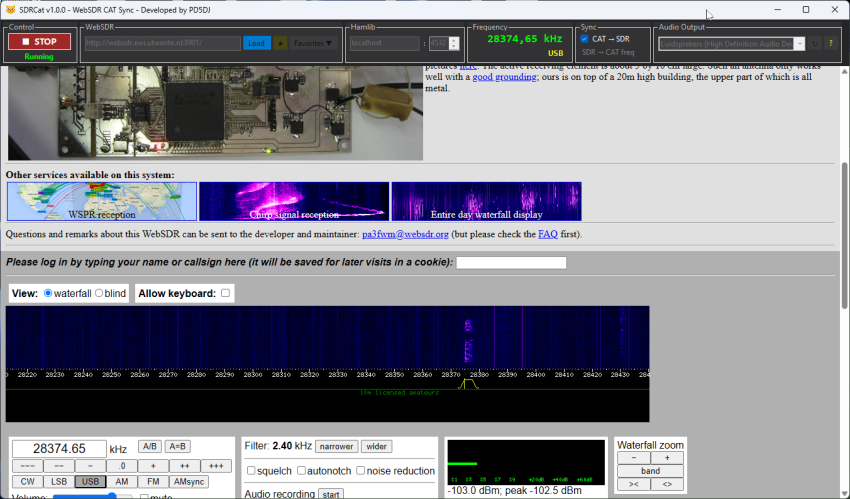
I’m happy to announce the release of SDRCat v1.0 — a free Windows application
that links your transceiver to a WebSDR receiver via CAT control (Hamlib).
Change the frequency on your radio and the WebSDR follows. Click a signal in the WebSDR and the
frequency goes straight to the transceiver. A live band scope while you operate on your own antenna,
with no extra hardware required.

Key features
- Two-way sync — CAT → WebSDR and WebSDR → CAT, polled every 200 ms
- Mode sync — USB, LSB, AM, FM and CW follow the rig automatically
- Audio routing — route WebSDR audio to any Windows output device, including virtual audio cables (VB-Audio, VAC) to feed a decoder like WSJT-X or fldigi directly
- Favourites — seven WebSDR stations pre-loaded, add your own
- Built-in browser — WebSDR runs embedded via WebView2, audio starts automatically
SDRCat connects to any Hamlib rigctld server on TCP port 4532.
HamlibServer —
also available on the site — makes this easy: select your rig, choose the COM port, click Start.
👉 sdrcat.ham4life.com — downloads, screenshots and full documentation.
73, PD5DJ